Showing posts with label Funny tricks. Show all posts

Wednesday, 5 December 2012

bug in windows calculator

Many people think that this is a bug in windows calculator. This is really amazing for a layman. Just write 9 in calculator, then press the square root button and then subtract 3 from it. As per our calculation it should give zero. But it does not give. It gives some fractional value.


Replace google with ur name

Replace google with ur name....!
There are are lots of website which allow you to change the default logo text in Google search.Just go to those website 

List of websites :


1) www.blingmysearch.com

2) www.buzzisearch.com

Enter your name
Select the style you want to use.
And here is your google search engine with your own name.
Bookmark it and make it your default home page.
Now every time you open your brower your own search engine will open.
You can also visit gmail,yahoo,msn,aol from same page from drop down

Coin Box Calling Hack

Steps:

1.Insert Coin

2.Dial 0##Phone No. *(star)

3.Call Unlimited

4.And Disconnect

5.Coin Comes Out

6.Go Home Smiling...~

Sunday, 18 November 2012

Add Your Name (or) Application to right click Of My Computer

Caution ..
As it is related to Windows regisrty it can be dangerous
so,Try This at ur own risk 


To write your name on right click application
please follow the steps:


1.Copy/Paste the following code in Notepad And then Save it as .reg 

Windows Registry Editor Version 5.00 
[HKEY_CLASSES_ROOT\CLSID\{20D04FE0-3AEA-1069-A2D8-08002B30309D}\shell\Registry Editor] 
@="Your Name Or Name of the Application" 
[HKEY_CLASSES_ROOT\CLSID\{20D04FE0-3AEA-1069-A2D8-08002B30309D}\shell\Registry Editor\command] 
@="Location Of The Application"

2.
Now edit it and then Type your name In 

Eg:

[HKEY_CLASSES_ROOT\CLSID\{20D04FE0-3AEA-1069-A2D8-08002B30309D}\shell\Registry Editor] 
@="Rajesh" 

3. If u want to get any application, once you click Your name or name of application
Then , Type the location Of the application Which u want to open In: 

[HKEY_CLASSES_ROOT\CLSID\{20D04FE0-3AEA-1069-A2D8-08002B30309D}\shell\Registry Editor\command] 
@="Location Of The Application"

For eg.C:\Program Files\Yahoo!\Messenger\messenger.exe
Thats It finally save it And then Run it .


------------------------------------------------------------
To add Application Control Panel
[HKEY_LOCAL_MACHINE\SOFTWARE\Classes\CLSID\{20D04FE0-3AEA-1069-A2D8-08002B30309D}\shell\Control Panel\command]
@="rundll32.exe shell32.dll,Control_RunDLL"

To add Application Add/Remove 
[HKEY_CLASSES_ROOT\CLSID\{20D04FE0-3AEA-1069-A2D8-08002B30309D}\shell\Add/Remove\command]
@="control appwiz.cpl"

To add Application Reboot
[HKEY_CLASSES_ROOT\CLSID\{20D04FE0-3AEA-1069-A2D8-08002B30309D}\shell\[Reboot]\command]
@="shutdown -r -f -t 5"

To add Application Shutdown
[HKEY_CLASSES_ROOT\CLSID\{20D04FE0-3AEA-1069-A2D8-08002B30309D}\shell\[Shutdown]\command]
@="shutdown -s -f -t 5"

Sunday, 28 October 2012

Trick to create empty Huge File


Here's the step by step guide to create a Empty Huge File :


  1. First we have to convert the desired file size into hexadecimal notation. You can use the Windows Calculator in Scientific mode do to this.To use Windows calculator in scientific mode Open calculator,click on view and select Scientific instead of Simple.

    Suppose you want a file of 1 million bytes.
    Enter 1000000 in the calculator and click on the Hex option to convert it (1 million in hex is F4240.)

    Pad the result with zeroes at the left until the file size reaches eight digits—000F4240.

Saturday, 22 September 2012

Bug In Windows Calculator


Have you ever used square root button in windows?

If yes, it is a possibility that you might have come across this bug…. If not, you are just about to know it..

Just follow the steps:-

1) Open calculator ie..  
   Goto run and type – calc 
2) Now type the following
   2.1) Type 4
   2.2) Take its square root  by using the square root button,
   2.3) Now you will get 2. Subtract 2 from it.
   2.4) The answer should have been 0 but its not. You would have       got a long number as your answer.

See.. it was as simple.

Here is the general syntax to this bug.

1) Take Any number 
2) Take its square root
3) Subtract its square root from it
4) Your answer is not 0.. That’s the bug.

I am sure this was something new for most of you out here..;-)


Monday, 10 September 2012

Run Firefox inside Firefox – Trick


How about Opening Firefox inside Firefox which is again in another Firefox?
And its really easy too, just type in this url in Firefox’s address bar and there you go!
Copy paste following url in a web browser (Mozilla Firefox).

chrome://browser/content/browser.xul

Following is the screenshot of this trick (firefox in firefox in firefox, which is again in another firefox)-
Do comment below if you like the post..


Tuesday, 21 August 2012

Trick to play PacMan Game on Google


To play PacMan Game on Google go to


Friday, 10 August 2012

See 911 attack on notepad


Now the attack of World Trade Center can be seen on a simple Notepad file. Let’s begin this trick with the bit of information – The flight number of the respective flight that hits twin tower was Q339.
 However,  new notepad versions change it recently. So you have to change 9 to N. 

Now let’s begin this interesting trick:
  1. Open a new notepad file.
  2. Type Q339
  3. Increase the font size to 72
  4. Change the font type to “Wingdings” 


I can see your expression. Yes it’s the power of notepad or just a mere coincidence.

Tuesday, 24 July 2012

Starting up without a windows logo


Starting up without a windows logo
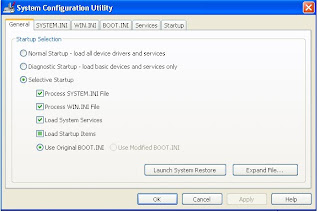
It's very funny to boot windows without its traditional logo. I found that by doing some trick you can start windows without its logo. For that you can go to 'start|run' and then type 'msconfig' followed by [enter]. Now a window like this will appear 


Select the 'BOOT.INI' tab, check the '/NOGUIBOOT' option and click on 'ok' to confirm. Now when you boot your windows starts without its logo.

Tuesday, 17 July 2012

Make your computer speak

Make your computer speak when u log on


Lets Do It:

Open Notepad
Paste the bellow code in Np

Dim speaks, speech
speaks=”Welcome Back, Username”
Set speech=CreateObject(“sapi.spvoice”)
speech.Speak speaks

Disable Windows Logo Key

Disable Windows Logo Key

the following article in microsfot website, and it did work, hope this helps, thanks!CODE

http://support.microsoft.com/?kbid=181348

or in other articles, u can copy the following messages into ur notepad and save as *.reg, and use it..

Windows Registry Editor Version 5.00

[HKEY_LOCAL_MACHINE\SYSTEM\CurrentControlSet\Control\Keyboard Layout]


“Scancode Map”=hex:00,00,00,00,00,00,00,00,03,00,00,00,00,00,5b,e0,00,00,5c,e0,\
00,00,00,00

Please share and like it.

Saturday, 14 July 2012

Shortcut to lock computer

Create a Shortcut to lock your Computer


Steps

1. Right Click on an empty slot on Desktop, point to New and click on Shortcut.


2. In the dialog box that pops up, type the following code without quotes in the Type the location of the item.

rundll32 user32.dll,LockWorkStation


3. Click on Next and type a name for the shortcut in the Type a name for this Shortcut textbox.


4. Click on Finish.

I'm feeling lucky fun on Google


I'm feeling lucky fun on Google


  1. Google Flight Simulator
  2. Google Gothic
  3. Goglogo
  4. Google Reverse
  5. Google Piglatin
  6. Google God
  7. Ewmew Fudd
  8. Google Bork
  9. Pigeon Rank
  10. Google Klingon
  11. Google Church
  12. The Google Book
  13. Mental Plex
  14. Google Gulp
  15. Google TiSP
  16. CADIE
  17. gDay with MATE 
  18. Translate for Animals
  19. Google Pond
  20. G.C.H.E.E.S.E.
  21. Funny Google
  22. "Googlo" 
  23. Google Blackle 
  24. Google Variations

Shut your Computer using CMD

Shutdown Your Computer


Type "shutdown -s" without the quotes in the command prompt and press Enter. Shutdown is the command being executed and the switch -s 

tells the computer to shutdown.

Make disco in keyboard lights


Cool Keyboard Tricks (Windows) : Make a Disco


Keyboards usually have small LED's which indicate whether different types of locks are activated or not. Here is a trick to use the lights of your keyboard in a more creative manner in Windows.
To make your own live disco, follow the steps given below:-

1. Open Notepad.
2. Copy paste the exact code given below:-

Funny Virus to continue eject CD/DVD Drive

Create a Harmless Funny Virus with Notepad-Continuously eject CD/DVD drives

This VBS trick will create a code which will continuously eject all your connected Optical drives. If you put them back in, it will pop them out again. Copy this code and paste it in Notepad as Virus.vbs or *.vbs.

Make keyboard type any message continuously

Make Your Keyboard Type (Any) Message
Continuously-VBS Trick

This VBS trick can make any of your friend's keyboard type any message continuously. Open Notepad, copy the code given below and save the file as Tricks.vbs or *.vbs.

Set wshShell = wscript.CreateObject("WScript.Shell")
do
wscript.sleep 100
wshshell.sendkeys "This is a Virus. You have been infected."
loop

You might need to restart your computer to stop this. Send this file to your friends as an email attachment to see the fun.

Matrix Effect


Matrix Falling Code Effect


@echo off
color 02
:tricks
echo %random%%random%%random%%random%%random%%random%%random%%random%
goto tricks

Copy and paste the code given below in Notepad and save the file as "Matrix.bat" or *.bat.

Upon running the bat file, you will see the "Matrix falling code" effect.