Showing posts with label How stuff works. Show all posts

Friday, 18 January 2013

How To Get Your Android Phone All Notifications Right On Your Desktop Screen

Say, you are in office and working on your computer very deeply. In that time, you may like to keep your smartphone on silent mode to avoid the interruption. That’s a great decision to keep it while working, but what would you do when you need to act on a text, mail, even a call while you are sinking on works. Well, in this circumstance, you can’t ignore them completely because of the importance; therefore, you have to keep alert your smartphone to receive those items notifications. After all, if you get anonymous or telemarketing types of message, which is drawing your attention while working, then it would be an over-annoying moment at your work time. 


However, these all are kinds of similar cases we face usually in our professional as well as personal life. Sometimes we conclude—that it would be great, if we would receive these all notifications straightly from smartphone to the desktop of our computer, and then respond them without even touching the device itself. Well, it’s not so defective though it would not be possible to complete somehow.

An open source application dubbed “DeskNotifier” would be able to do this by connecting your android smartphone notifications system to the notification system of your windows desktop over Wi-Fi or via data cable. It has developed by “XDA member greenday123” to make your working life easier and more comfortable. So let’s see how you can use this tool to shrink the interruption while working and to keep doing both your job and smartphone simultaneously. 

How to use desknotifier to receive your android phone all notifications straightforward 
to your Windows Desktop

How To Make A Backup Of Drivers And Restore On Windows 8/7/Vista/Xp

Many times you found that your system need a clean OS installation as some problem can't be removed in Windows OS except reinstalling OS. And This implies for all Windows OS may be your old Windows XP or current Windows 8.

But it's not really a problem to reinstall OS its just matter of some minutes and if you are installing Windows via pen drive or flash drive then a few minutes. The main problem arises in installing driver of all of your hardware like your optical drive or your display driver , sound driver etc.

Driver is a medium via which OS access that particular hardware on your machine mean if your PC don't have a display driver then you may see big everything on desktop , having no clearness. Laptop/notebook comes with preloaded driver and some company provide you some basic driver CD not all.

So after clean OS installations you may need to visit the manufacturer's site to download driver for your Laptop/notebook. If your model is very old then you may not find drivers on the manufacturer's site. Not only this installing driver one by one is somehow a headache. So avoid this problem the best way is to make a backup of your drivers , and after clean install of Windows OS just restore or install these drivers with one click.

So I am going to help you how to make a backup of drivers on Windows 8/7/Vista/XP and also help you how to restore your backup file. The method is simple and straight forward. Have a look-

Part I : How To Make Backup files of drivers

Thursday, 3 January 2013

Types of Proxy | Hide IP Address


A proxy server acts as an interface between the user and the internet if you want to Change your IP Address.
Don’t know what is IP Address?
Read: What is IP Address
Now I’ll come to the heart of the post, which contains the answer to your curious question How to Hide the IP address ? The only solution to hide your IP address is by using a Proxy Server. But Wait! The story doesn’t end here. Even though proxy servers are the only way to hide your IP address, there are several ways of connecting your PC to the proxy server. Before setting up the connection with the proxy servers you must know some information about different types of proxy servers and their uses.
1. Transparent Proxy Server
This type of proxy server identifies itself as a proxy server and also makes the original IP address available through the http headers. These are generally used to speedup the web browsing since thay have a very good ability to cache websites. But they do not conceal the IP of it’s users. It is widely known as transparent proxy because it will expose your real IP address to the web. This type of proxy server does not hide your IP address.
2. Anonymous Proxy Server
This type of proxy server identifies itself as a proxy server, but does not make the original IP address available. This type of proxy server is detectable, but provides reasonable anonymity for most users. This type of proxy server will hide your IP address.
3. Distorting Proxy Server
This type of proxy server identifies itself as a proxy server, but make an incorrect original IP address available through the http headers. This type of proxy server will hide your IP address.
4. High Anonymity Proxy Server (Elite Proxy)
This type of proxy server does not identify itself as a proxy server and does not make available the original IP address. This type of proxy server will hide your IP address.So this is the best way to mask your IP.

Which Proxy Server is the best to Hide My IP ?
I know, you can answer this question better than me.Obviously High Anonymity Proxy or Elite Proxy is the best to hide your IP. But it’s not easy to get a list of working elite proxies. If you search the Google, you will definitely get tons of proxy list. You’ll get a list of proxies in the following format

IP:Port Number

Eg: 221.90.45.67:8080 (221.90.45.67 is the IP of the proxy server and 8080 is the port number)
But most of them don’t work. Here are some of the problems/risks associated with using free proxies that are available on the internet.
  • Most of them do not work since the proxy servers frequently changes it’s IP/Port number.
  • Even if you find a working proxy server it may be too slow.
  • Your privacy is not guaranteed since all your traffic is routed through the proxy server.
  • The administrators of the proxy servers may steal your valuable information such as passwords, SSN (Social security number), Credit Card details etc.
So with all these being the risks then how to find a working, fast ,highly anonymous and secured Proxy servers?
Now I will share the software that works like charm to change the email accounts.
Hide My Ass pro Vpn is the best proxy server out there. I personally loved it.

How to ensure that the IP is hidden ?
Before you hide your IP you can check your real IP by visiting the following site.
Once you get your real IP, switch on your IP hiding software. Now once again visit the above site and check your IP address. If you see a new IP then this means that your software is doing the right job. Also the above site(Whatismyipaddress.com) is capable of detecting many proxies. If you see the words such as “suspected proxy server or network sharing device” or similar words then it means that the proxy you are using is not an Elite Proxy.
One Final Word before you leave! Even though Elite proxies are almost undetectable they can be detected at a higher level. But the process would be much harder and time consuming than free proxies. So only high end elite proxies are recommended by us.
One More thing, it is unsafe to use free proxy during e-commerce transactions such as Online banking, Online Credit Card payment etc. So please avoid free proxies during these circumstances and use elite proxies (like hide my ass pro vpn) only if required.
I Hope this post helped you to learn about the types of proxy servers and how to hide ip address to a great extent.
Feel free to pass on comments.

Friday, 28 December 2012

Create Ghost image of Hard Disk

How to create ghost image of hard disk for

free?

If yes then you are the person who want to backup complete disk 

along with OS. So lets see how we can create hard disk image or 

ghost image or disk clone without using those highly priced ghost 

creating software.


Requirements:

Ubuntu Live CD/DVD, A hard disk with more capacity than the one 

you want to clone and some basic knowledge of Linux.


Procedure:

Linux provides disk dumping feature, this feature can be used for 

creating complete backup of any possible storage media. And we 

will use this feature of Linux command shell to create ghost 

images. While writing this tutorial I am assuming that you want 

to backup a hard disk which already have an OS installed in it.

Saturday, 22 December 2012

What is CAPTCHA and How it Works?


CAPTCHA or Captcha (pronounced as cap-ch-uh) which stands for “Completely Automated Public Turing test to tell Computers and Humans Apart” is a type of challenge-response test to ensure that the response is only generated by humans and not by a computer.
In simple words, CAPTCHA is the word verification test that you will come across the end of a sign-up form while signing up for Gmail or Yahoo account. The following image shows the typical samples of CAPTCHA.

How Windows Product Activation (WPA) Works?


Windows Product Activation or WPA is a license validation procedure introduced by Microsoft Corporation in all versions of it’s Windows operating system. WPA was first introduced in Windows XP and continues to exist in Windows Server 2003, Windows Vista, Windows Server 2008 and Windows 7 as well.
WPA enforces each end user to activate his/her copy of Windows so as to prevent unauthorized usage beyond the specific period of time until it is verified as genuine by Microsoft. How WPA really works was a closely guarded secret until GmbH analyzed WPA using a copy of Windows XP RC1 and published a paper on their findings.
In this post you will find answers to some of the most frequently asked questions about Windows Product Activation.

Friday, 14 December 2012

How Firewalls Work


If you have been using Internet on a regular basis or working in a large company and surf the Internet while you are at work, you must have surely come across the term firewall.
You might have also heard of people saying “firewalls protect their computer from web attacks and hackers” or “a certain website has been blocked by firewall in their work place”. If you have ever wondered to know what exactly is this firewall and how it works, here we go. In this post I will try to explain “How firewalls work” in a layman’s terms.

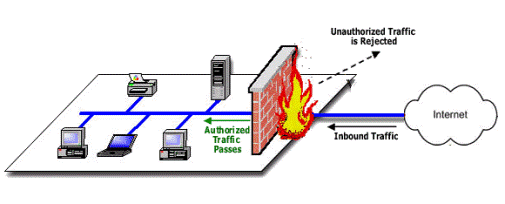
How Firewalls Work?

Firewalls are basically a barrier between your computer (or a network) and the Internet (outside world). A firewall can be simply compared to a security guard who stands at the entrance of your house and filters the visitors coming to your place. He may allow some visitors to enter while denying others whom he suspects of being intruders. Similarly a firewall is a software program or a hardware device that filters the information (packets) coming through the Internet to your personal computer or a computer network.

How Antivirus Software Works


Due to ever increasing threat from virus and other malicious programs, almost every computer today comes with a pre-installed antivirus software on it. In fact, an antivirus has become one of the most essential software package for every computer.
Even though every one of us have an antivirus software installed on our computers, only a few really bother to understand how it actually works! Well, if you are one among those few who would really bother to understand how an antivirus works, then this article is for you.

How Domain Name System (DNS) Works


In the world of Internet and the area computer networks, you will often come across the term Domain Name System or Domain Name Service which is simply referred to as DNS. The working of DNS forms one of the basic concepts of computer networks whose understanding is very much essential especially if you are planning to get into the field of ethical hacking or network security.
In this post, I will try to explain how Domain Name System works in a very simple and easy to follow manner so that even the readers who do not have any prior knowledge of computer networks should be able to understand the concept.

What is a Domain Name System?

A “Domain Name System” or “Domain Name Service” is a computer network protocol whose job is to map a user friendly domain name such as “hacking.com” to it’s corresponding IP address like “173.245.61.120″.

Wednesday, 28 November 2012

What is IIS Exploit


This tutorial is about website hacking that are working on older versions of IIS server. We will be discussing about what is a IIS server and how hackers can upload deface pages on it.
Note:- This tutorial is for information purpose only. Hacking tips won’t be responsible for any harm caused due to the information. We aim to create awareness so that you can protect yourself from getting hacked.

Q) What is an IIS Server ?
A) IIS [Internet Information Service] is a web server developed by Microsoft to use with Mircosoft Operating systems.

Wednesday, 14 November 2012

How to Change the Color of Facebook

We all know that Facebook home page is looks in blue color. How do you feel if you see your Facebook account in another color without blue?
I'll show you a method to change your Facebook color !!!
You can change the color of Facebook by using Greasemonkey Add-on in Firefox web browser. By using this Add-on you can change the color of Facebook to anything as your wish.


Decrease The Shutdown Time In Windows

Whenever you give the shutdown command in your Windows PC, it forwards the request to all the running services. It waits before it tells you if any of the service did not respond to the shutdown request (waits for 12 seconds in Windows 7 and 6 seconds in Windows 8). You can then force stop them or wait for them to respond. But if you have many services running, then 12 seconds for each service is much time to wait for.

Tuesday, 6 November 2012

How to Create New partition in Windows 7


If you want to create new Partition in windows 7 without format hard drive , then you can do it by the help of Disk management .

Follow these steps to Create new partition in Windows 7


1. Right-Click on My Computer , then Click on Manage .


How to disable User account in Windows 7


If there are multiple account exits in your system then you want disable Administrator account disable without deleting or removed user account the you can do it without loss data . when Administrator account will be disabled then  it will not be show on log on screen .


Follow these steps to disable User account.....


1. Click on Start Button , then Right-click on My Computer and then Click on Manage .

Sunday, 28 October 2012

How to Close Open Ports

Trojans are backdoor programs that create a connection with the help of open ports many of us are suffering from Trojans.they are one of the dangerous weapon for hackers.

If a hacker install a Trojan on your computer then he can do anything with your computer while sitting to thousands of km far away from your computer.After a successful installation of Trojan hacker can use your computer as a Zombie computer and can do any kind of illegal work with your IP address Or even can able to delete your valuable data.


Thursday, 25 October 2012

How To Increase The Battery Life Of Your Laptop


Just recently I've given 3 reason why you should choose a laptop over a desktop. I also state that one of the biggest advantage over desktop is the ability to save energy but how can you save energy if your laptop remains a slave to your wall outlet because it cannot last longer than an hour? here are several means to make your laptops’ battery last longer.

1. Darken your screen

Your laptop screen is found to be the most power-hungry component of your laptop. Your laptop screen needs high amount of battery power to maintain it’s clear and luminous display. To preserve this power you can adjust it’s brightness to a low level.

Wednesday, 17 October 2012

Different Types of Malware and How They Work

Malware is a collective term used to represent virus, worms, spyware and other malicious programs out there on the Internet. In simple words, any software program that is intended to cause direct or indirect harm to the computer system is referred to as a malware.
Some malware programs cause serious problems such as destroying the system files, causing disruption to the computer operation or gathering sensitive information while others may only have a light impact such as redirecting websites to pornographic content or annoying the users with pop-ups and banners.
In the normal routine, we have often seen every malicious program being referred to as a virus, but this is not correct! In fact, as mentioned earlier, there exists several malicious programs where virus is one among them. Now, many of you may may be wondering to know what’s the difference between them. Well, this article gives a detailed information on different types of malware that exist, how they work and how they differ from each other:

1. Computer Virus:

As we all know, this is the type of malware that has become highly popular and is one of the most widely discussed topic in the field of computer security. A virus is just a computer program that is designed to take unauthorized control of the infected computer so as to cause harm to the system’s data or degrade it’s performance.

Mode of operation:

Computer viruses operates by attaching themselves to an already existing file or program and replicates itself to spread from one computer to another. In most cases, they tend to infect executable files that are parts of legitimate programs. So, whenever the infected file is executed on a new computer, the virus gets activated and begins to operate by further replication or causing the intended damage to the system.
A virus cannot perform it’s task of harming and replication unless it is allowed to execute. This is the reason why viruses often choose an executable file as it’s host and get attached to them. Viruses are mainly classified into two types:

Thursday, 30 August 2012

Enter a windows XP without entering the password in the log on screen

Here is a trick from which you can access any friends computer physically without entering there password on the log on screen.

This works only on WINDOW XP Operating Systems.

Start your Computer and wait for User Log In Screen to appear After  Turning On the computer 


Now Just Press the following Keys---> Alt+Ctrl Button and Two times Delete Button.

Wednesday, 29 August 2012

CREATE BOOTABLE WINDOW


USB: Requirements

 Windows 7 or Vista ISO

 Pen drive with 4GB+ (2 GB is sufficient for XP)

 15 Minutes of free time


#WinToFlash Tool Procedure:

1. Insert your USB flash/pen drive to your system and backup all the data from the USB as 

your USB drive will be formatted during the process. 

2. Now download software WinToFlash tool (free). (FROM google)

3. Run the tool, and browse to your Windows 7, Vista, or XP 

DVD files (make sure that your USB drive letter is correct).

4. Click Create button to begin the bootable USB process. Wait for few minutes to see the
bootable USB.

5. That’s all!

Tuesday, 21 August 2012

Disable Automatic Update of Google Chrome


Google chrome has very quickly gained popularity thanks to its speed,minimal design,nice interface.The development of the browser is also taking place at rapid speed.After every few weeks there is a new version of chrome that is launched.

Most of you are not even aware when your google chrome gets updated with its silent updater.For heavy computer user’s this can be a waste of memory as google updater stays in the memory silently.This can also be annoying for those which have slow dial-up connections or have limited data plans.I will give you trick to disable automatic updates of chrome but you will be still able to update it manually whenever you want it.
Follow the steps below to learn the Trick To Disable Automatic Update of Google Chrome
For Window 7 and Window  Vista  Users